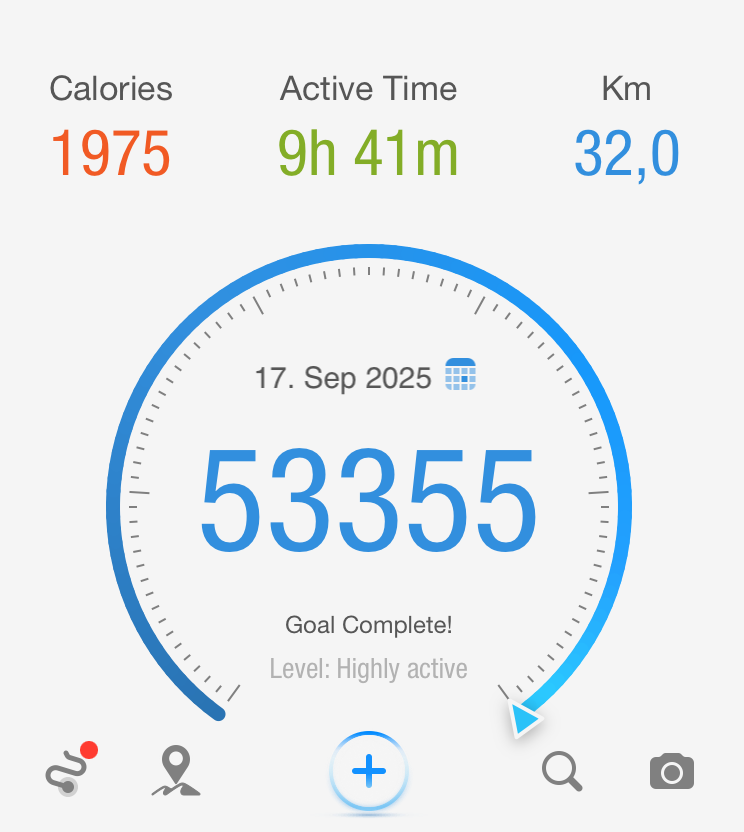
During my own experience walking around Berlin, I covered about 40 km on my first long walk and 32 km on the second. Surprisingly, on the second walk, I took more steps and spent more time walking, yet ended up covering fewer kilometers. This unexpected result made me curious to understand why the Pacer app showed such differences, prompting me to research the factors behind these variations.
January 22, 2026
Why Do Step Counts and Distance Differ in the Pacer App? [Explained]
Step counts and distance in the Pacer App often differ because steps come from your phone’s motion sensors while distance is calculated from GPS and stride length — and these rarely match perfectly.
Walking enthusiasts often trust the Pacer app to track their daily steps, distance, and activity time. However, users sometimes notice discrepancies in step counts versus distance tracked—like walking more steps yet covering a shorter distance on different days. This article demystifies why the Pacer app might report varying results and how factors like stride length and GPS impact accuracy.


Understanding the Pacer App’s Tracking Methods
The Pacer app uses your phone’s motion sensors to count steps and GPS to estimate distance. These two measurements do not always perfectly align. For example, in one session, I recorded 51,519 steps in 8 hours 39 minutes covering 40.6 km, but on another walk, I logged 53,355 steps in 9 hours 41 minutes for only 32.0 km. What causes such differences?
Stride Length Variations Affect Results
Stride length—the distance covered per step—is a big factor. A longer stride covers more ground per step, so fewer steps are needed for the same distance. Factors influencing stride length include:
-
Walking speed (faster pace usually means longer stride)
-
Terrain (uphill, sand, or rough surfaces shorten stride)
-
Fatigue (tired walkers take smaller steps)
-
Personal height and walking style
If you take shorter steps, your total step count increases even if the distance is less.
GPS and Sensor Accuracy
The Pacer app’s distance calculation depends on GPS signals, which can be influenced by:
-
Cityscapes and signal obstructions
-
Winding routes where GPS smooths fine details
-
Sensor calibration issues in your phone
Sometimes the app might register accurate steps but underestimate or overestimate distance due to temporary GPS loss or tracking errors.
Real-World Example Table
| Activity | Steps | Distance (km) | Time | Avg. Step Length (m) |
|---|---|---|---|---|
| Walk Day 1 | 51,519 | 40.6 | 8h 39m | 0.788 |
| Walk Day 2 | 53,355 | 32.0 | 9h 41m | 0.600 |
Average step length = Distance in meters / Steps
In this example, the shorter stride on the second day meant more steps were tracked for less distance.
How to Improve Accuracy in the Pacer App
-
Calibrate your stride length in the app settings.
-
Walk in open areas for better GPS tracking.
-
Regularly update your smartphone and app to benefit from improvements.
Why the Pacer App May Show Different Distance Results for the Same Route
Understanding Pacer Accuracy: What the Data Really Shows
Accuracy in the Pacer app depends not only on your settings but also on how and where the data is collected. Pacer can pull step and distance information from multiple sources, including your smartphone sensors, GPS tracking, and connected platforms like Apple Health, Fitbit, Garmin, or Samsung Health. Each source uses different algorithms to estimate steps, stride length, and distance, which explains why users may see slight variations between step count and total distance.
For distance tracking, GPS-based activities generally provide the most reliable results, especially during outdoor walks or runs. GPS accuracy improves in open areas with a clear signal and can be affected by buildings, trees, or poor signal conditions. When GPS is unavailable, Pacer estimates distance using step count and stride length, which can introduce small errors over time.
Studies on smartphone pedometer apps suggest an average margin of error of around 5–10%, depending on walking speed, phone placement, and movement patterns. While wearables can reduce some inconsistencies, no consumer tracking method is perfectly precise. This is why trends over multiple days or weeks are more meaningful than focusing on a single session.
To improve consistency, users should ensure height and stride information is correct, keep both the app and operating system updated, and avoid frequently switching between data sources. Understanding these factors helps set realistic expectations and allows users to get more value from Pacer’s step and distance data.
If you want to use Pacer‑style tracking to reach real fitness goals (weight loss, endurance, daily step targets), I offer personal training in Berlin and online to turn your numbers into progress. Contact me >>HERE<<
Final Thoughts: Making the Most of Your Walking Data
For anyone serious about walking or fitness tracking, understanding how the Pacer app calculates distance and steps can help you use it more effectively. If you notice that your step count and distance results vary, don’t worry—it’s not necessarily an error. Instead, it reflects natural changes in stride length, terrain, and GPS accuracy. By paying attention to these details, you can better analyze trends in your performance rather than focusing on one-off results.
You can also use the Pacer app’s walking insights to track your progress over time. Comparing average step length, pace, and distance across multiple walks gives you a clearer picture of your endurance and consistency. Pairing the Pacer app with other fitness tracking apps or smartwatches can further improve accuracy and help you understand your personal walking patterns more deeply.
In the end, the key takeaway is consistency: whether you’re walking through city streets or park trails, regular movement matters far more than minor differences in data. Use those variations as motivation to keep improving rather than as a source of confusion. With a bit of awareness and calibration, the Pacer app remains one of the most reliable tools for everyday walkers and long-distance enthusiasts alike.
Conclusion
In summary, understanding Pacer app steps vs distance discrepancies empowers fitness enthusiasts to optimize their tracking for accurate walking and running goals. Factors like stride length variations—shorter for walking (2,000-2,500 steps per mile) versus longer for running (1,000-2,000 steps)—directly influence these metrics, as confirmed by fitness trackers.
Calibrate your Pacer app regularly via its sensitivity settings for improved precision, especially during jogs or treadmill sessions, and pair it with professional personal training at Thian Training to convert data into real body composition results. Ready to master your steps? Book a free consultation today and elevate your fitness journey beyond the app.
Read the first article here: Walking for Weight Loss: My 40 km Challenge